

Replace Legacy NAS with an Operational File Data Platform on Microsoft Azure
Modernizing file data and maximizing Azure starts with a free assessment to understand your legacy NAS environment and plan a phased migration.
November 19, 2026 | Paul Horn and Nate Klaphake

If you’re planning a refresh of your network-attached storage (NAS), you likely have questions. You may be wondering how much capacity to buy, how long it will last, and how to move your data while everyone keeps working. Hardware costs and delivery times make those decisions harder. At the same time, your data keeps growing. More locations need access. And the business wants to make AI work with all of its data.
Buying another array leaves plenty of work on your plate. Someone still must test backups and disaster recovery resilience while keeping remote offices connected. Your team also must manage copies and permissions across systems that may have different requirements. That work continues long after the new hardware arrives.
Then comes the AI problem. You want your AI tools to use as much of your enterprise data as possible, as long as it doesn’t sacrifice compliance with regulatory mandates. Microsoft’s 2026 Work Trend Index finds that while Frontier Firms utilizing AI agents give teams more room to direct work and make decisions, agents can only work with the knowledge they can reach. For most enterprises, much of that knowledge lives in files: drawings, contracts, models, and project records. When those files sit on aging NAS spread across sites, they are hard for people to share and harder for AI to reach.
Together, these issues make moving off legacy NAS a thornier problem than simply choosing a cloud provider and moving forward.
What your NAS really costs
NAS expenses total more than a simple purchase and upkeep. File infrastructure often continuously grows, one office or project at a time. You then add backup and recovery capacity to protect that storage as well as replication, so every office that needs to access files can do so. Each addition brings more systems to support and contracts to renew, and every new location starts the cycle again.
Your employees feel the cost, too. An engineer waits for a large project file to open, and a team waits for IT to restore a folder before it can get back to work. Those hours won’t appear on your next storage quote, but they count. So do hardware maintenance, administration, and capacity held in reserve for future growth. These costs balloon over time, as research shows enterprise unstructured data is growing at nearly 50% per year, which can exhaust traditional NAS controller limits and force organizations into continuous, high-cost capacity upgrades.
Modernize NAS with a clear starting point
While NAS migration can be a logistical headache, a free NAS migration assessment from Nasuni can help establish a baseline for evaluating the full environment, not just the next array.
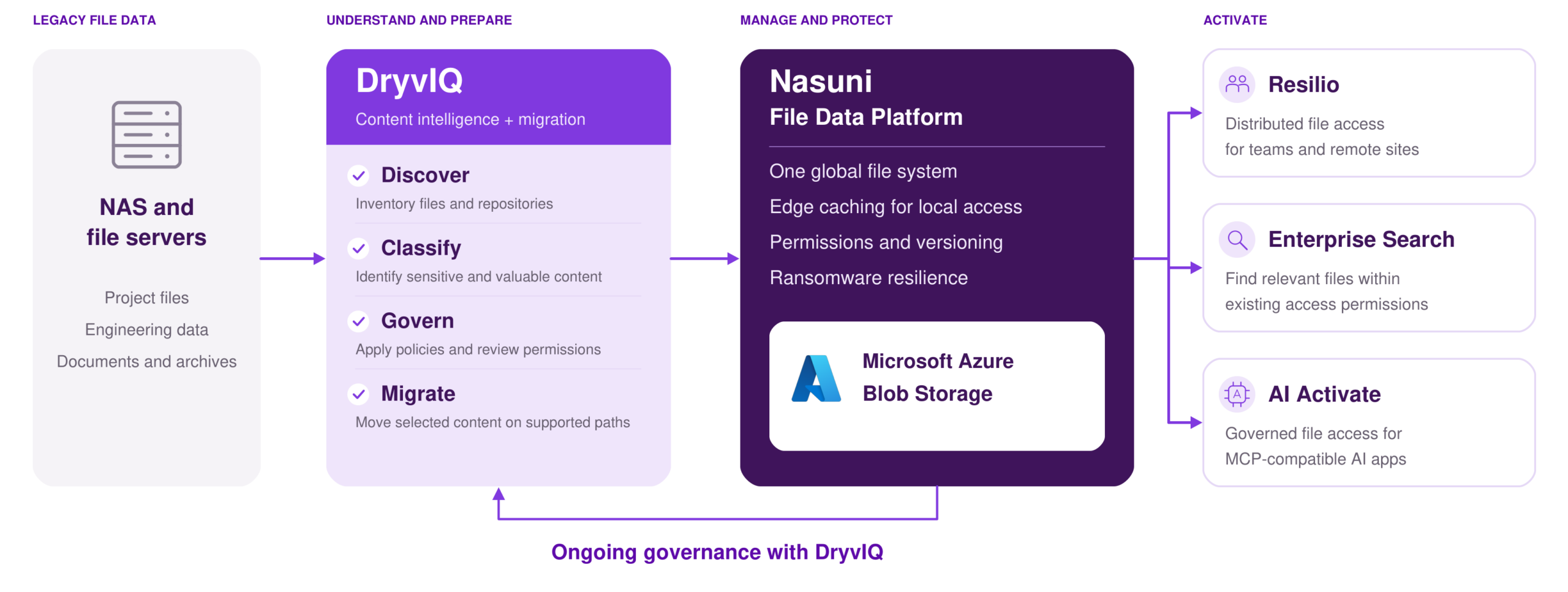
Nasuni is the Operational File Data Platform for the AI Era, bringing data to your people, and AI to your data. Together, Nasuni and Microsoft help enterprises manage operational file data on Azure, protect it with governance, and activate it for global teams and enterprise AI.
As a Microsoft Solutions Partner with Azure-certified software, Nasuni stores file data in your own Azure Blob Storage account and is available through Azure Marketplace. Nasuni is trusted by more than 1,300 enterprises globally, providing one platform to modernize file infrastructure, maintain trusted data, and support governed access for Microsoft Copilot and other compatible AI experiences through Nasuni AI Activate.
New capabilities deepen that connection to Azure. Azure Blob Access Points are designed to make Nasuni-managed file data accessible to compatible Azure services through a standard Blob interface, without requiring a separate copy. Integration with Azure Data Manager for Energy (ADME) connects Nasuni file data to energy workflows while Resilio and DryvIQ extend distributed file delivery, content intelligence, and migration capabilities on Azure.
For example, when Aker BP was looking to move to a cloud-first strategy, Microsoft recommended Nasuni. Nasuni helped replace on-premises storage and tape backup for the company, cutting restore times from weeks to minutes for one of Europe’s largest independent oil and gas companies. Aker BP is now evaluating Nasuni’s ADME connector to link file data with its energy applications. And it’s also working to bring that file data into its AI Hub for Copilot through AI Activate.
Run your file environment on Azure
To make data more usable across teams, Nasuni uses UniFS, a global file system that brings enterprise file services to Azure Blob Storage. Your files live in Azure, while Nasuni Edge Appliances keep active files close to the people and applications using them.
Alongside UniFS, Resilio extends high-performance delivery to remote and far-edge sites. You can size local infrastructure for the files your teams are working on, rather than everything you’ve ever stored.
As file data grows, capacity scales in Azure Blob Storage rather than requiring a new primary NAS array at every site. A global namespace and centralized management help bring fragmented environments together while supporting familiar file workflows. Immutable snapshots and file versioning strengthen ransomware resilience and recovery, helping reduce dependence on separate backup and disaster recovery infrastructure.
Know what you have before you move it
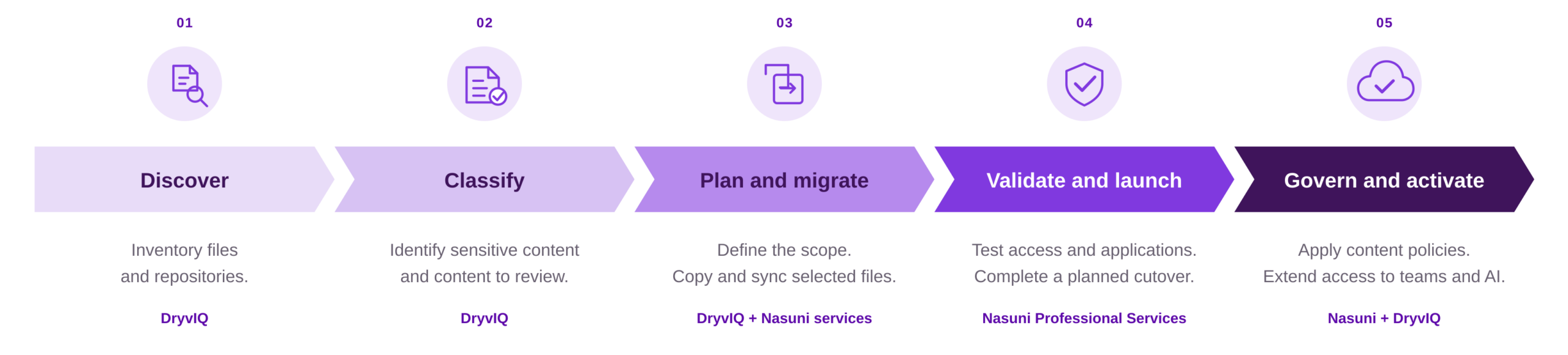
Before you move years of accumulated files, it helps to know what’s in them. Some support current projects. Others contain sensitive information or need to be kept for a specific period. Some may be ready for archive or review. A migration gives you a chance to sort through these decisions, helping you set a solid governance foundation for your next era of work.
DryvIQ, a Nasuni company, helps you discover and classify content, identify sensitive information, apply governance across supported repositories, and migrate data between supported platforms. This helps you preserve permissions and metadata during migration. The result is more thorough than a lift-and-shift: teams can make informed decisions about what moves, what doesn’t, and what needs stronger controls first. DryvIQ also helps you maintain governance after migration as new content arrives and policies evolve.
Put your files to work for people and AI
Once your operational data migrates and is correctly governed, it needs to be activated. Nasuni Enterprise Search helps authorized users find content across enabled Nasuni data, respecting existing access permissions.
Nasuni AI Activate connects compatible AI applications and agents to operational file data through the Model Context Protocol (MCP). It checks existing permissions before returning content to AI experiences like Microsoft Copilot, so AI access does not become a free pass to sensitive files. This helps bring current, permission-aware context to Copilot and enterprise AI without building a second repository or recreating the file permission model. The goal is straightforward: give Copilot the context your business runs on, without compromising sensitive data.
Plan the move around your business
The right migration starts with a clear picture of the current environment and the business outcomes you want. Rather than treating a NAS refresh as another hardware purchase, assess the full estate and plan a phased transition that can be validated against real workloads.
As Nasuni CEO Sam King put it, “You don’t have to wait for a refresh to evaluate an alternative.”
- Understand what you run today. Map your storage, growth, access patterns, and protection requirements. Check which applications depend on the files and include the systems around your NAS in the cost comparison.
- Pick a place to start. Choose a site or dataset where there’s a clear reason to move and a result you can measure. Decide which content belongs in the first phase and which needs more review.
- Test before you expand. Plan how files will transfer and when users will switch over. Check permissions, application behavior, file access, and recovery. Use what you learn to improve the next phase.
- Check what changed. Track the infrastructure you retire, the time your team spends managing files, and how access and recovery perform. Those results will help you decide where to go next.
Nasuni Professional Services can support architecture, migration planning, testing, and phased cutover. Depending on the environment and agreed plan, existing systems can operate during migration while data is transferred and validated. The goal is a controlled transition while minimizing disruption.
Start with a free NAS migration assessment
Nasuni and Microsoft are introducing a free legacy NAS migration assessment to help eligible organizations evaluate their file environments and explore modernization on Azure. The assessment is a practical starting point for understanding current infrastructure, identifying migration priorities, and discussing a phased path forward. Availability is limited.
Start by contacting the Nasuni team to confirm whether your environment qualifies. From there, the assessment can inform an architecture conversation, a prioritized migration plan, and, where appropriate, guided migration with Nasuni Professional Services.
A NAS refresh no longer has to mean more complexity. With Nasuni, it can be the first step toward a governed file data foundation on Azure that helps your people and your AI work with greater context and trust.
Related resources
Cloud partner – Microsoft Azure
Our partnership helps simplify file management admin & gives you better security and insights from your data.
Learn more
September 23, 2025 | Paul Horn
Why Frontier Firms Start with Nasuni and Microsoft
Paul Horn explains how Nasuni and Microsoft empower Frontier Firms through a secure, scalable, AI-ready data foundation.
Read more
Aker BP
How one of Europe’s most forward-thinking energy producers replaced legacy storage with a cloud-native platform that is laying the unstructured data…
Learn more